
This guide will help you on How to Install ICARUS Mods on Your Server
Rent an Icarus Server with Citadel Servers Today
Installing mods on your ICARUS server allows you to customize gameplay, rebalance mechanics, introduce custom items, and enhance the survival experience for everyone on your server. While ICARUS does not feature native Steam Workshop auto-sync for dedicated servers, adding mods is a straightforward process once you know where to place the mod files and how to configure them properly. Before getting started, ensure you have full access to your server's file management system, either through your hosting provider's Control Panel or via FTP (File Transfer Protocol) like FileZilla. It is also essential to ensure that any mods installed on the server match the game version to prevent crash loops or connection timeouts for joining players.
(Note: Most ICARUS mods require both the server and all connecting players to have the same mod .pak files installed locally. If players fail to install matching mods on their local game clients, they may experience connection errors or crash on load.)
Installing Mods on Your Icarus Server
1. Download your desired mod file from either NexusMods or ProjectDaedalus.
2. Log in to your Game Control Panel and navigate to your service.
3. Before making any changes, ensure that your server is fully stopped.
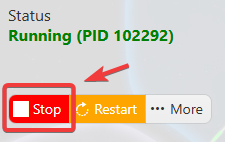
This helps prevent configuration changes from being overwritten or reverted to their default values.
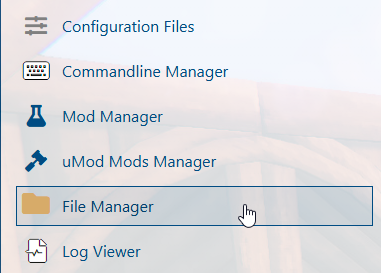
4. Navigate to the File Manager tab to access your server’s configuration settings.
5. Access your server files and locate the directory: /home/container/Icarus/Content/Paks/mods.
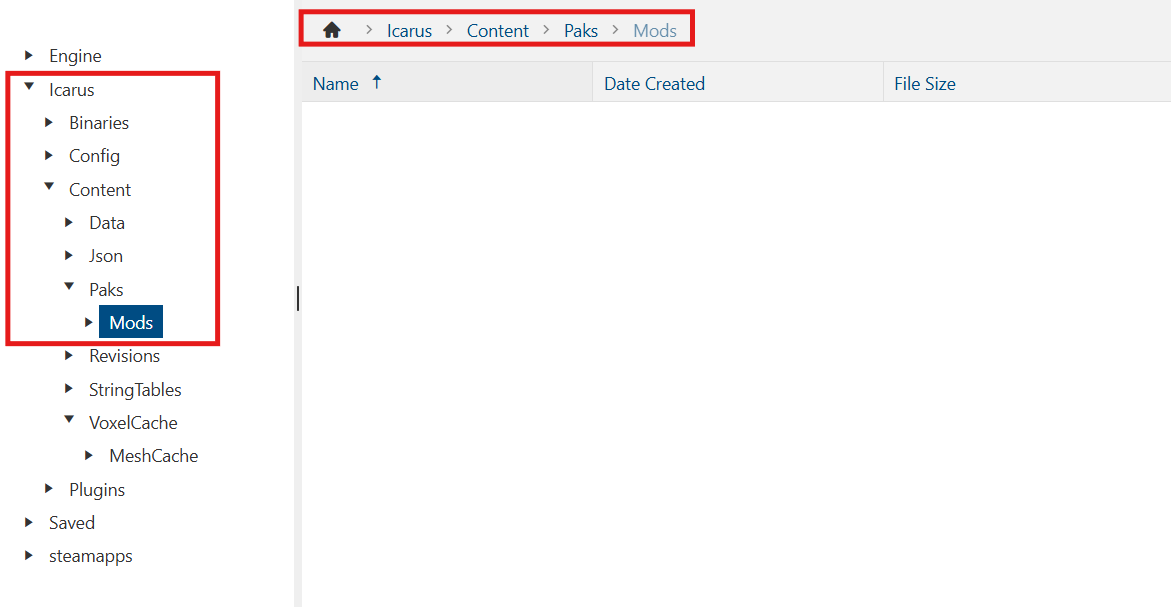
(Note: If the mods folder does not exist in the specified directory, please manually create a new folder and name it mods.)
6. Upload the mod files obtained in Step 1. If the files are compressed in a .zip archive, right-click the file and select Unarchive (or Extract).
7. Start the server to load the newly installed mods.