

This guide will show you how to configure the Day/Night Cycle on your Necesse Server
Looking for a Necesse game server? Click here to order your server!
The day/night cycle in Necesse plays an important role in shaping the overall gameplay experience. The length of each cycle determines how long players have to explore, gather resources, build, complete tasks, and prepare for the challenges that occur during different times of the in-game day. For server administrators, adjusting the day and night duration can be a useful way to customize the pace of gameplay to better suit the needs and preferences of their players. When hosting a Necesse dedicated server, administrators can configure the duration of the day and night cycle through the server's available settings. Changing these values allows you to create longer or shorter periods of daylight and nighttime without having to rely on the default cycle. This can be particularly useful for communities that prefer extended exploration periods, faster gameplay progression, or a specific balance between daytime and nighttime activities. This guide explains how to configure the day/night cycle on your Necesse server, including where to locate the relevant settings, how to adjust the duration, and how to apply and verify the changes. The process is intended for server administrators who have access to the server's configuration and the permissions required to modify its settings. Before making any changes, it is recommended to ensure that the server is properly configured and that you have access to its management interface or configuration files. Depending on how your Necesse server is hosted, the exact location and method for changing these settings may differ. Always review the available server options for your current version of Necesse, as configuration methods and settings may change with future updates. Adjusting the day/night cycle can affect the pacing of your server, so consider the experience you want to provide before selecting new values. A longer daytime period can give players more time to explore and complete activities before nightfall, while extending nighttime can create a different pace and increase the amount of time players spend dealing with nighttime conditions. Conversely, shorter cycles can make the game world progress more quickly. By the end of this guide, you will understand how to locate and modify the appropriate day/night settings on your Necesse server and how to confirm that the new cycle duration has been applied successfully. This will allow you to customize the server's gameplay pacing while maintaining a consistent experience for everyone playing on the server.
Configuring the Day/Night Cycle
1. Log in to your Game Control Panel and navigate to your service.
2. Before making any changes, ensure that your server is fully stopped.
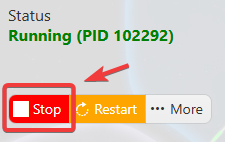
This helps prevent configuration changes from being overwritten or reverted to their default values.
3. Navigate to the Configuration Files tab to access your server’s configuration settings.
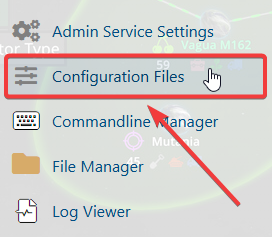
4. In the configuration files, navigate to saves\worlds\Citadel New World\worldSettings.cfg, then select Text Editor to open the file.

5. In the file, locate the dayTimeMod and nightTimeMod settings and adjust their values to up to 10. A higher value will increase the duration of both the day and night cycles.
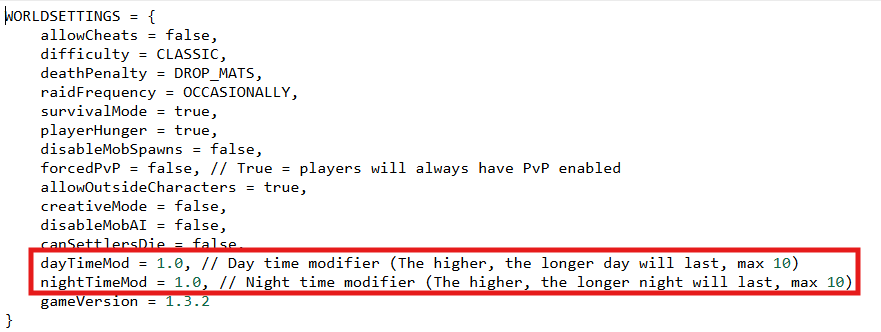
6. Once you have finished editing the settings, click the Save button to apply the changes to your server.